


 ArtVPS, the company behind Shaderlight - the leading interactive rendering plugin for Trimble SketchUp - is launching a secure, cloud-based collaboration platform that enables AEC professionals to share ideas and 3D data.
Showing posts with label render. Show all posts
Showing posts with label render. Show all posts
ArtVPS launches new cloud-based platform for AEC professionals to share 3D projects
 ArtVPS, the company behind Shaderlight - the leading interactive rendering plugin for Trimble SketchUp - is launching a secure, cloud-based collaboration platform that enables AEC professionals to share ideas and 3D data.
Chaos Group Ships V-Ray 2.0 for SketchUp
 With today’s launch of Chaos Group’s V-Ray 2.0 for SketchUp, the access designers have to faster rendering, better lighting tools, and more detail in complex scenes has reached new heights. It’s the biggest expansion to V-Ray for SketchUp’s rendering capabilities yet, and it’s all thanks to the help of a vast and very dedicated group of beta testers.
Making of Old Town – Day, Night (V-Ray Tutorial)
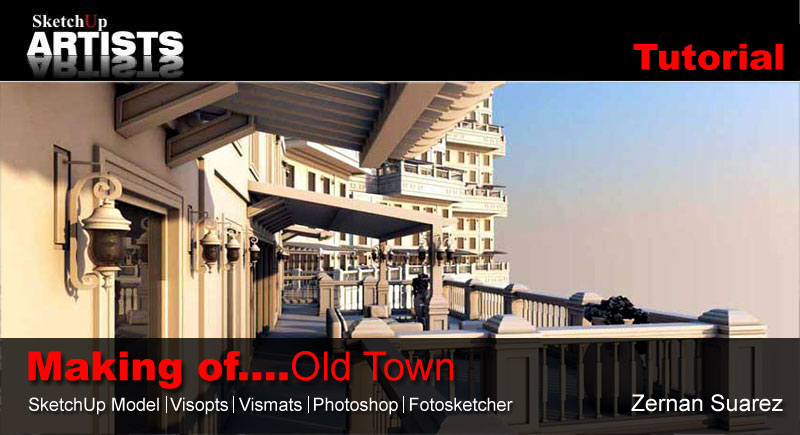
3D Vizualiser and Graphic designer Zernan Suarez has produced this tutorial for us, covering scene set-up, materials, both day and night renders and NPR. Software used includes SketchUp, V-Ray for SketchUp, Photoshop and the freeware filter software FotoSketcher. Included in this comprehensive tutorial are downloads to help you follow along if you wish.
Best SketchUp renderers comparison
In this review we'll compare four popular rendering solutions for SketchUp. The initial criteria as to which products were selected included the need for a trial version to be available, and the renderer needed to be accessible from within SketchUp, so it needs to include an actual plugin. The renderers we picked were Indigo Renderer, SU Podium, Maxwell and V-Ray.
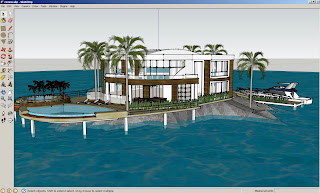
The test scene was fairly simple, a house next to water with a boat, one of the most popular models in the 3D Warehouse that Google offers, created by Andres. The process we then go through for each renderer is the same, and is what most users who are fairly new to making renders with SketchUp would do. We first find the plugin, download it, install it, then start doing test renders of our scene. Note that none of these tests included in-depth tweaking of materials, as the purpose of the review is comparing their features and qualities out of the box.
Indigo Renderer
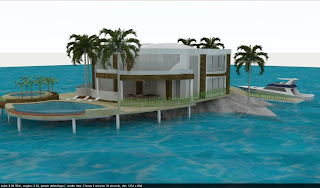
Indigo Renderer was the first in line, and the installation process is fairly simple. You have to download two components for it to work. First, there's the Indigo Renderer standalone software, then there's the SketchUp plugin. Once both are installed, you simply fire up SketchUp and selectRender from the Plugins menu. On the first run, it will ask you to locate the indigo.exe file. This can be somewhat of a pain if you forgot where you installed the standalone product, but it's usually under C:\Programs Files\Indigo Renderer. Once that's done, the render starts almost immediately.
On this system, to make a render of 1374 x 804 pixels resolution, Indigo took over an hour, although after around 20 minutes most of the noise was gone, and you can save the resulting image at any point. To start tweaking the result, you can go in the Plugins menu and change the settings, including the size of the render and the exposure. There's also a built-in material editor which allows you to modify the SketchUp materials and add additional attributes like reflection, roughness, bump mapping, and so on.
When you start tweaking, you can gain much better results, and depending on the version you buy, you can have some advanced settings available to you. The demo places watermarks on your images but otherwise seems fully functional. The full software costs €145 or €595.
SU Podium
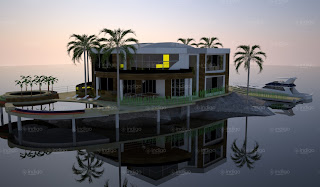
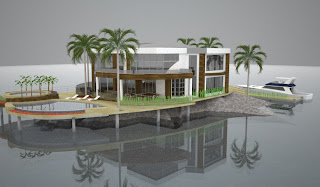
The next renderer we took a look at was SU Podium, which is also one of the oldest options available for SketchUp. The installation of this one is even easier, because there isn't two separate downloads, it's just one plugin. Once you download and install the product, you can start SketchUp and render right away.
The good news is that the render only took 2mins 10secs on default settings. The bad news is that the result looked much worse. Also, there seems to be less options available, although like every other product it comes with its own material editor. The demo also restrict the size of your render, although it doesn't put a watermark on it. The full version is available for $198.
Maxwell for SketchUp
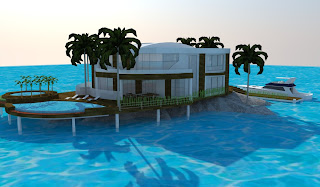
Maxwell is well known for it's standalone product, but only recently did the company release its SketchUp plugin. The installation is much worse than the previous two options. There is no setup file, instead you download a zip file, and then have to read through a readme text, copy files to a specific directory, and install MSVC libraries. Once it's installed however, it worked similarly to the previous choices. Under the Plugins menu, you select Maxwell Fire to start rendering.
The render took 8 minutes to finish, and was fairly good, certainly better than SU Podium, although no sky was generated, unlike Indigo. Also, the image seemed to have more noise overall. They do win on the price point however, with two versions of the plugin, one free which has a maximum resolution of 800 pixels, and one at $95.
V-Ray
V-Ray is the professional solution, the gold standard used by many studios all over the world. But on top of their high grade Autodesk plugins, they also offer a SketchUp plugin as well. The demo can be downloaded after you register on their site, and works for 30 days. The installation is simple, a single download file that you run. One thing I did notice however is that it slows down SketchUp's loading time.
With default settings, a render took 6 minutes, and the quality is somewhat average. Certainly it looks better than some of the previous products, but the default water is left as is, and the bright colors are as well. Fortunately, V-Ray seems to offer the most options and material features of the four reviewed products, allowing very fine grain modifications. On the negative side however is the price, around $800, depending on the reseller.
In closing, it's important to note that all of these renders were done with default settings and materials. If you wish to do high quality SketchUp renders, you would need to dig into the specific material editor of your chosen plugin, and modify them accordingly. Still, it does give a good idea of the default results, and render speeds.

The test scene was fairly simple, a house next to water with a boat, one of the most popular models in the 3D Warehouse that Google offers, created by Andres. The process we then go through for each renderer is the same, and is what most users who are fairly new to making renders with SketchUp would do. We first find the plugin, download it, install it, then start doing test renders of our scene. Note that none of these tests included in-depth tweaking of materials, as the purpose of the review is comparing their features and qualities out of the box.
Indigo Renderer
Indigo Renderer was the first in line, and the installation process is fairly simple. You have to download two components for it to work. First, there's the Indigo Renderer standalone software, then there's the SketchUp plugin. Once both are installed, you simply fire up SketchUp and selectRender from the Plugins menu. On the first run, it will ask you to locate the indigo.exe file. This can be somewhat of a pain if you forgot where you installed the standalone product, but it's usually under C:\Programs Files\Indigo Renderer. Once that's done, the render starts almost immediately.
On this system, to make a render of 1374 x 804 pixels resolution, Indigo took over an hour, although after around 20 minutes most of the noise was gone, and you can save the resulting image at any point. To start tweaking the result, you can go in the Plugins menu and change the settings, including the size of the render and the exposure. There's also a built-in material editor which allows you to modify the SketchUp materials and add additional attributes like reflection, roughness, bump mapping, and so on.
When you start tweaking, you can gain much better results, and depending on the version you buy, you can have some advanced settings available to you. The demo places watermarks on your images but otherwise seems fully functional. The full software costs €145 or €595.
SU Podium
The next renderer we took a look at was SU Podium, which is also one of the oldest options available for SketchUp. The installation of this one is even easier, because there isn't two separate downloads, it's just one plugin. Once you download and install the product, you can start SketchUp and render right away.
The good news is that the render only took 2mins 10secs on default settings. The bad news is that the result looked much worse. Also, there seems to be less options available, although like every other product it comes with its own material editor. The demo also restrict the size of your render, although it doesn't put a watermark on it. The full version is available for $198.
Maxwell for SketchUp
Maxwell is well known for it's standalone product, but only recently did the company release its SketchUp plugin. The installation is much worse than the previous two options. There is no setup file, instead you download a zip file, and then have to read through a readme text, copy files to a specific directory, and install MSVC libraries. Once it's installed however, it worked similarly to the previous choices. Under the Plugins menu, you select Maxwell Fire to start rendering.
The render took 8 minutes to finish, and was fairly good, certainly better than SU Podium, although no sky was generated, unlike Indigo. Also, the image seemed to have more noise overall. They do win on the price point however, with two versions of the plugin, one free which has a maximum resolution of 800 pixels, and one at $95.
V-Ray
V-Ray is the professional solution, the gold standard used by many studios all over the world. But on top of their high grade Autodesk plugins, they also offer a SketchUp plugin as well. The demo can be downloaded after you register on their site, and works for 30 days. The installation is simple, a single download file that you run. One thing I did notice however is that it slows down SketchUp's loading time.
With default settings, a render took 6 minutes, and the quality is somewhat average. Certainly it looks better than some of the previous products, but the default water is left as is, and the bright colors are as well. Fortunately, V-Ray seems to offer the most options and material features of the four reviewed products, allowing very fine grain modifications. On the negative side however is the price, around $800, depending on the reseller.

In closing, it's important to note that all of these renders were done with default settings and materials. If you wish to do high quality SketchUp renders, you would need to dig into the specific material editor of your chosen plugin, and modify them accordingly. Still, it does give a good idea of the default results, and render speeds.
How to Improve Renderings

Edge lines are a perfect way to show off detail in a SketchUp model. But what happens when the user wants to render a high quality image of their model? If edge lines aren’t used, the details can be washed out due to lighting and material choices. Using rendering software that can support edge lines can give the user a high quality image as well as helping to make the details of their model stand out.
Lumion looms large!
“A new & easy tool for architects and their clients, discover how fast you can create high quality movies.”
Certainly a bold statement, but given the pedigree, Act-3D™ B.V. have delivered a product designed from the ground up for creating breathtaking 3D visualizations. With Quest3D already under their belt Act-3D™ B.V. has released Lumion after months of anticipation.
Certainly a bold statement, but given the pedigree, Act-3D™ B.V. have delivered a product designed from the ground up for creating breathtaking 3D visualizations. With Quest3D already under their belt Act-3D™ B.V. has released Lumion after months of anticipation.
 |
Lumion® |
Another SketchUp Renderer Available for Free: IDX Renditioner
IDX Renditioner output
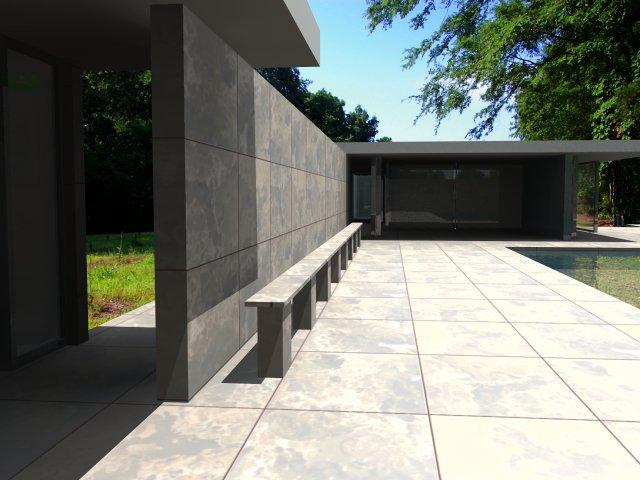
Joining the ranks of already available free rendering engines for SketchUp (likeKerkythea and Indigo) is the free version of IDX Renditioner Express.
This is a full featured copy of the main product with the only limitations being a reduced image size (max. 600×480 versus 4096 x 4096 in the full version) and less lighting options.
Although the image size is very small in this free version, it may be worth to give the program a try based on user-friendliness: apparently it is pretty much a one-click renderer.
(alexschreyer.net)
OnTime5D plugin tested on newly released Sketchup 8
I just tested the OnTime5D plugin on the newly released Sketchup 8, and it works without a problem. Sketchup 8 was recetly released by Google and can be found on http://sketchup.google.com/.
SketchUp 8 Upgrades & Features
 Did you realize that SketchUp has been around for some four years? Time really flies, and over the years we’ve noticed that the number of user-generated 3D buildings springing up in Google-Earth has increased dramatically, so it’s about high time a new version of this program came out which is geared toward the production of Google Earth-ready models. Google has obviously noticed that this is a popular pastime among SketchUp fans.
What's New in Google SketchUp 8
What's New in Google SketchUp 8
We've stuffed SketchUp 8 full of new and improved features:
Google Launches SketchUp 8 3D Modeling Software

Google on Wednesday announced a new version of its 3D modeling software, SketchUp 8.
New features include model geo-location integration with Google Maps, more accurate terrain and color aerial imagery, improved photo matching for model building, and integration with Google Building Maker, a 3D modeling tool for adding buildings to Google Earth.
Indigo Renderer
Indigo Renderer simulates the physics of light to achieve photo-realistic renderings while keeping setup times and trial and error to a minimum. Indigo uses unbiased physically correct rendering methods which produce the highest levels of realism demanded by architectural and product visualization. Workflow is fast and easy using the well-integrated SketchUp plugin, SkIndigo, which has been widely praised for its ease of use and fast responsive development.

Casa 2

Interiors


