


 |
| The Trimble Scan Explorer Extension |
Showing posts with label sketchup 8 plugins. Show all posts
Showing posts with label sketchup 8 plugins. Show all posts
3D Scanning Extension for SketchUp

SketchUp script clips #1: Setup and basic ideas

In this series of posts, I will be exploring how one can create scripted geometry in SketchUp. Traditionally, this has been more the realm of programs like Rhino. And justifiably so. Rhino is NURBS-based and can create and modify curved geometry much better than SketchUp. However, SketchUp is an easy-to-use program for working with polygon-mesh-based geometry. It also has a built-in scripting language (Ruby) and best of all – it’s free. So if you want to script SketchUp to automate small tasks or to create interesting geometry, then this may be a good series of posts to follow.
Phlatscript Google SketchUp Plugin
 The Phlatscript plugin created by Mark and Trish Carew of Phlatboyz, LLC is a plugin allowing you to turn SketchUp models into a real life physical model. The plugin converts the SketchUp project into gcode to be produced in a cnc (computer numerical control) plotter. It allows you to create inside and outside cuts, tabs, folds and more. We do not have much experience in CNC plotting but from what we can see, if you have one of these printers than this plugin works really well.
SketchUp Plugins: Extruding and Offsettin Curved Faces
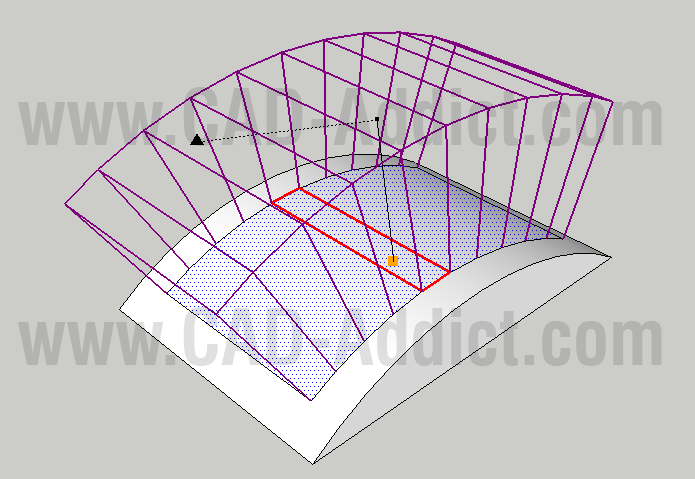 The new sketchup plugin! Extruding and Offsettin Curved Faces!
The Joint Push Pull plugin created by Fredo on SketchUcation.com is a useful tool to use the push pull command on curved surfaces. There are times that you need to do this and the original tool provided by SketchUp will not work on surfaces if they have even a slight curve to them. Joint Push Pull solves this dilemma.
Organic modeling with the Artisan plugin
SketchUp plugin wizard Dale Martens (a.k.a. Whaat) recently released an amazing and incredibly useful organic modeling toolset called Artisan. Based on Dale’s popularSubdivide & Smooth tools, Artisan is perfect for people who want to use SketchUp to model organic shapes and terrain features. Artisan includes a set of “deformation” tools that allow you to sculpt, smooth, flatten, pinch and apply textures just like you would with a brush.
 The toolbar for Dale Martens' Artisan Organic Toolset for SketchUp
 Eric Lay modeled Patrick Beaulieu's "Bobby Bubble" character, then rendered him (her?) with Twilight Render.
Amsterdam adds another dimension in Google Earth
For those of you who have not had the pleasure of visiting the beautiful city of Amsterdam for yourself, I’m happy to say that Google Earth now offers the next best thing: Amsterdam in 3D.
Very cool plugin: Proper Animation (video) with tutorial
Somewhere near the top of SketchUp's all-time list of feature requests, there's a big, bold headline that reads ANIMATE THE MOVEMENT OF OBJECTS. It's something all of us have wanted to do at one time or another. Unfortunately, it's also not something we've managed to tackle just yet. And that's why Ruby script plugins for SketchUp are so darn useful.
A while ago, I found out about a nice little plugin called Proper Animation. Watching the teaser video (below) inspired me to model and animate my very own robotic contraption. Shockingly, it only took me about half and hour to do; Proper Animation is refreshingly easy to figure out and use.

Creating a Spring - free spring plugin

The Spring Plugin allows you to create springs or coils of any length, pitch, diameter and gauge; using a simple dialog box to input the required dimensions. Springs can be used in a variety of engineering, architectural and sculptural applications. To get the free Spring Plugin, click the download link below and follow the on-screen instructions.
RpWallMaker - Free plugin

RpWallMaker Free is a free add-on for Google SketchUp (Windows or Mac) to create wide walls (3D walls with thickness), edit them and cut holes in them.
The custom walls are generated by drawing the center line of the wall in SketchUp and the wide, 3D wall is automatically generated.
Mirror Tool Google SketchUp Plugin

The Mirror Tool plugin created by an unknown author at the Ruby Library Depotis a useful tool to have when using SketchUp. It allows you to mirror as you would in AutoCAD.
To use the tool all you need to do is click the object you want to mirror and click the “mirror selection” button. Then you can signify the mirror line simply and click enter. This tool though also allows you to keep selecting axis’ to accurately mirror the object the way you like. This comes in handy particularly when you need to mirror about an axis that is not one of the main axis’ on SketchUp.
Overall, the Mirror Tool plugin at the Ruby Library Depot is an essential plugin to have especially for AutoCAD users. At the time of this review this plugin is free and is available at the Ruby Library Depot. I give this plugin 5 out 5 stars!
VRay - Rendering an interior scene (Tutorial)
Part I: Adjusting the GI settings
Step 1. First render1.1. Open the scene (which can be found here).1.2. Assign VRay as the current renderer.Since the default VRay settings are not very well suited for a fast initial preview, we'll make a few quick adjustments before the first render.1.3. Check the Override mtl option in the Global switches rollout, click the button next to it and select a default VRayMtl material.1.4. Set the Image sampler type to Fixed.1.5. Set the resolution to 400 x 325.1.6. Set the Region size in the System rollout to 32 x 32 pixels.1.7. Optionally, you can turn on the Frame stamp to print the render time on the image.1.8. Render the scene:

Regular Polygon Keyframe Animation Plugin (Video)
Regular Polygon has published a keyframe animation for SketchUp version 7 & 8, Free or Pro.
Main Features include:
Main Features include:
- Keyframes are easily added, deleted, renamed, and reordered.
- Any group or component can be animated.
- Animated groups (components) can be nested.
- Animated groups (components) can be nested inside of non-animated groups (components).
- Animated groups (components) are interpolated between keyframes by translation or rotation.
- The interpolation lasts for the entire keyframe transition time.
- Keyframes can have independent transition times.
- Keyframes can have independent delay times.
- The keyframes can be converted to a slideshow of ordinary (non-animated) scenes, called tweens.
- The number of tweens depends on the frame rate you set.
- The tween slideshow can be exported to an AVI movie, or to image files (PNG, JPEG, TIF, or BMP)
Plugin: Instant Roof, instant productivity
Instant Roof, by Chuck Vali of Vali Architects, is a truly great SketchUp Ruby script. Its purpose is simple – you use Instant Roof to quickly create gables, hips, sheds and trellises anywhere you need them. This script has everything going for it:
It's easy to install. Pop one file into your plugins folder and you're done.
It's easy to learn. Chuck (the script's author) has put together a huge pile of fantastic instructional PDFs and videos on his website. The in-product help is also comprehensive and well-placed.
It's easy to use. Everything's right there in the Plugins menu, so you don't have to memorize and keep track of a bunch of little tool icons. The input method for telling the script where to put gables and sheds couldn't be simpler.


