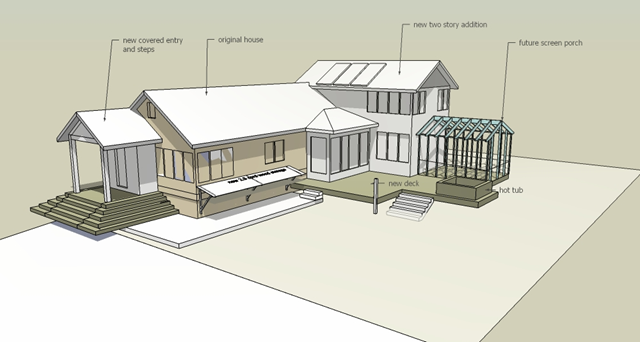
History - sketchup


Wiki article,Sketchup history
SketchUp was developed by startup company @Last SoftwareBoulder, Colorado which was co-founded in 1999 by Brad Schell and Joe Esch.[2]
Share:

Augmented Reality Plugin for Google SketchUp - AR-media™

With the Augmented Reality Plugin from AR-media™, Google™ SketchUp™ users are allowed to visualize their 3D models using Augmented Reality directly in the real physical space which sorrounds them. In a very precise sense, through AR-media™ Plugin, SketchUp™ 3D models can be visualized out of the digital workspace directly on users' desktop, by connecting a simple webcam and by printing a suitable code. The AR-media™ Plugin provides users with an advanced visualization functionality which serves two main purposes:
- Study and analyze scaled virtual prototypes in real environments
- Communicate 3D projects immersively and astonishingly
Share:

Anyone want to write some posts ?

Join our blog,share your experience with everyone,post your recent works,ask if you need to findout something...join us !!!
Share:

SketchUp Engineering ToolBox!

Online SketchUp Engineering ToolBox!

Add standard and customized parametric components - like flange beams, lumbers, piping and more - to your Google SketchUp model by usingsketchup.engineeringtoolbox.com.
Share:

Ten Beginner Tips for Using Google SketchUp

Whether you want to design a new addition to your house, plan your landscaping or just make a drawing for fun, Google SketchUp offers wonderful functionality for creating 3D models. Even better, it’s completely free. If you’d like to try your hand at designing with the program here are some simple tips to help get you started.
image


Share:

Urban Developer


Urban Developer uses a model based approach with objects such as project plans, sub plan areas and real-estate objects which have their own user interfaces and calculations. These properties can be accessed via the context menu within SketchUp. A project tree gives an overview of all the objects that are available on the urban development plan and charts area available to see the characteristics of the whole plan or its objects.
Installation of Urban Developer 2.1 Software Perquisites-
  • Windows 2000, XP, Vista, Windows 7
  • Microsoft .Net framework
  • Google SketchUp 7
  • Adobe Flash
Visit Urban Developer to learn more and get the plugin.
Share:

RPS RpReports


RpReports is a plug-in for SketchUp which lets you create your own applications with customized attributes, predefined attributes for components, and reports.
  • Define attributes for your application, such as manufacturer, part number, description, building, floor, and price. Some of these attributes are fixed for each component definition, and some can be set for each component instance.
  • Create a library of components for the users of the application to place.
  • Define the base and default attributes for each component.
  • Specify totals and sub-totals and other report customization.
This plug-in was created by Render plus System. The SketchUp model that you see on your screen is what will be rendered – with the same view, colors, materials, etc. You can render at the SketchUp image size, or at any other image size desired.
Visit RpReports to learn more and get the plugin.
caddboss
Boothy-Food Technology
Share:

SpecifiCAD™


SpecifiCAD TM Google SketchUp™ 7 delivers relevant building product data to the designer’s Desktop within the BIM environment using CADalytic Media’s patent-pending technology. CADalytic Media through SpecifiCAD™ delivers the functionality of the Sweets Network® to provide manufacturer content directly on the BIM desktop. Designers can quickly access CAD details, SketchUp™ 3D models, catalogs, three-part specifications, and Green information. SpecifiCAD™ also delivers relevant Google 3D Warehouse™ content including the McGraw-Hill Construction Sweets3D Collection content to the Desktop.
SpecifiCAD™ for Google SketchUp™ 7 and for CAD® BIM Models Architecture 2009 display McGraw-Hill Construction’s new Sweets Network® interface with the same linking enhancement available in previous versions of SpecifiCAD™.
Visit SpecifiCAD™ to learn more and get the plugin.
Share:

Photoshop CS3 Extended Plug-In for Google 3D Warehouse


Photoshop® CS3 Extended Plug-in for Google 3D Warehouse is a free plug-in that enables you to search and download 3D models from Google 3D Warehouse™ directly from Adobe® Photoshop CS3 Extended. Once you have downloaded the plug-in, you can search Google 3D Warehouse from Photoshop CS3 Extended by going to File>Automate>Search Google for 3D Model.
Visit Photoshop CS3 Extended Plug-In for Google 3D Warehouse to learn more and get the plugin.
Share:

eDrawings Publisher


The publisher is an add-on to SketchUp that allows designers to export their models to eDrawings format. eDrawings is a well accepted solution among MCAD professionals who need to share their designs among teams.The professional version enables users to Create markups, Measure the model, Create Cross-section, Password Protect eDrawings file, Move components and Insert Stamps.The tool allows you to generate an accurate representation of your SketchUp models that can be viewed (only) using the eDrawings viewer.
eDrawings models can be packed into an executable containing the viewer as well as the design data so that the recipients do not need to install or purchase any software to view the model.
  • Create compact & read-only eDrawings files from SketchUp models
  • Insert stamps & password protect your files
  • Save as EXE with viewer and design data, so that recipients do not need to install or purchase any software
  • Recipients can create comments & markups, measure & cross-section the model & move components
The add-on was created by Geometric Limited. Visit eDrawings Publisher to learn more and get the plugin.
Share:

Indigo Renderer


Indigo Renderer simulates the physics of light to achieve photo-realistic renderings while keeping setup times and trial and error to a minimum. Indigo uses unbiased physically correct rendering methods which produce the highest levels of realism demanded by architectural and product visualization. Workflow is fast and easy using the well-integrated SketchUp plugin, SkIndigo, which has been widely praised for its ease of use and fast responsive development.
Casa 2
Indigo-Renderer1
Interiors

Share:

Popular Posts

Google SketchUp is software that you can use to create 3D models of anything you like.On this blog you can find mostly furniture 3d models. sketchup, 3d models , sketchup models, sketchup components, .skp models, sketchup model , free sketchup models , furniture models , 3d models

Followers

Category

Recent Posts