


.jpg)
SketchUp at Trilogiq USA Expo Demonstrates Holistic Material Handling (VIDEO)

ArtVPS launches new cloud-based platform for AEC professionals to share 3D projects
 ArtVPS, the company behind Shaderlight - the leading interactive rendering plugin for Trimble SketchUp - is launching a secure, cloud-based collaboration platform that enables AEC professionals to share ideas and 3D data.
Chaos Group Ships V-Ray 2.0 for SketchUp
 With today’s launch of Chaos Group’s V-Ray 2.0 for SketchUp, the access designers have to faster rendering, better lighting tools, and more detail in complex scenes has reached new heights. It’s the biggest expansion to V-Ray for SketchUp’s rendering capabilities yet, and it’s all thanks to the help of a vast and very dedicated group of beta testers.
Maxwell for SketchUp 2013

Making of Old Town – Day, Night (V-Ray Tutorial)
3D Vizualiser and Graphic designer Zernan Suarez has produced this tutorial for us, covering scene set-up, materials, both day and night renders and NPR. Software used includes SketchUp, V-Ray for SketchUp, Photoshop and the freeware filter software FotoSketcher. Included in this comprehensive tutorial are downloads to help you follow along if you wish.
Trimble Delivers SketchUp 2013, New Version of 3D Modeling Platform for Architecture, Design and Construction Professionals
Product Updates Include New Capabilities and Tools to Match How Users Work
SUNNYVALE, Calif., May 22, 2013 /PRNewswire/ -- Trimble (NASDAQ: TRMB) today introduced SketchUp 2013, the latest version of the popular 3D modeling platform used by millions around the world, including architects, engineers, building and design professionals and members of the fast-growing maker community. Featuring new capabilities for professional users, an Extension Warehouse for add-on tools and a rebranding of the software's free version as SketchUp Make, the new release marks the first major update since Trimble's acquisition of SketchUp from Google in April 2012. The enhancements underscore SketchUp's strategic value as part of Trimble Buildings, a group formed in 2012 to offer hardware, software and service offerings for streamlined communication throughout the Design-Build-Operate (DBO) lifecycle of construction.
"Trimble has always recognized that one of the biggest challenges facing the construction industry today is ensuring effective, clear and consistent collaboration between professionals involved in all phases of a construction project," said Chris Keating, director of Trimble Buildings' Architecture Division. "SketchUp is an important tool to address this industry need. That's why Trimble has already implemented several SketchUp integrations with Trimble's data modeling and project management tools. SketchUp 2013 marks the first step in a continuous technology investment that will benefit SketchUp's existing user community and other Trimble customers across the construction industry."
3D for Professionals and Hobbyists
SketchUp Pro 2013 provides professional users with more powerful tools to easily explore, modify and share design ideas in 3D. As in previous versions, users can quickly design and visualize in 3D, import CAD plans, photos, aerial imagery, and then use SketchUp Pro's documentation tools to develop communication and planning deliverables. For example, architects can quickly evolve design ideas and document modeling work to reflect changing project requirements. SketchUp Pro also enables engineers, general contractors and building owners to drive design discussions and generate commercial deliverables such as conceptual estimates, construction drawings, RFI's and full-screen digital presentations.
The new release includes several improvements to SketchUp Pro's 2D documentation capabilities, including enhanced vector drawing tools, faster rendering and zooming, and customizable hatching styles. These updates make SketchUp Pro more powerful, precise and customizable for detailing, dimensioning and organizing models in professional documents.
In addition to serving the commercial market with SketchUp Pro, Trimble will continue to provide a free, entry-level, 3D drawing tool—now named SketchUp Make—enabling makers and hobbyists of all kinds to bring their ideas to life.
New Extension Warehouse Provides Easy Access to Customized SketchUp Tools
Since 2004, third-party developers have been using SketchUp's open and free API to build custom tools for SketchUp users. This plugin ecosystem grew throughout SketchUp's years at Google and now—in Trimble's first update—dedicated developers and their valuable modeling tools finally have a home within SketchUp. The Extension Warehouse makes it easier than ever for users to search, find and install SketchUp extensions. As developers begin using the Extension Warehouse to manage, market and support their extensions, SketchUp users can expect to have easy access to more and more task-specific tools.
"We may have changed companies, but our commitment to delivering smart and efficient design tools is stronger than ever," said John Bacus, director of SketchUp product management at Trimble. "We noticed that a big percentage of our professional users were using plugins, so part of making SketchUp more efficient is making it easier for them to find the tools they need, when they need them. We often say that SketchUp is better off because of the work done by our developer community—now, SketchUp users are better off too."
SketchUp Pro and SketchUp Make are available now. Additional information and downloads are available at:www.sketchup.com.
About Trimble Buildings
Trimble Buildings, a part of Trimble's Engineering and Construction segment, is a world leader in technology for construction project optimization across the design-build-operate (DBO) lifecycle. By providing intuitive software and field solutions that span the brands of SketchUp, Tekla, Vico Software, Plancal, Meridian Systems, and WinEst, Trimble is dedicated to helping building owners and AEC service providers improve productivity, increase efficiencies and maximize profitability of construction projects across the entire workflow from simulation to renovation. Trimble Buildings' DBO portfolio draws on unparalleled expertise from across the entire continuum to provide building professionals with comprehensive solutions that respond to their specialized needs while benefiting from an understanding of the total workflow at every step. For more information, visit:http://buildings.trimble.com.
About Trimble
Trimble applies technology to make field and mobile workers in businesses and government significantly more productive. Solutions are focused on applications requiring positioning or location, including surveying, construction, agriculture, fleet and asset management, public safety and mapping. In addition to utilizing positioning technologies such as GPS, lasers and optics, Trimble solutions may include software content specific to the needs of the user. Wireless technologies are utilized to deliver the solution to the user in the field and to ensure communication between the field and the office. Founded in 1978, Trimble is headquartered in Sunnyvale, Calif.
For more information, visit: www.trimble.com.
GTRMB
Google sell SketchUp to Trimble Navigation

Google has agreed to sell its 3D modeling platform SketchUp to Trimble Navigation for an undisclosed sum, the companies announced on Thursday.
SketchUp is a popular 3D modeling platform used for architectural purposes, as well as films and games. The program, which is known for its ease-of-use, allows models to be created within the context of Google Earth. Google purchased it back in 2006, and offers it for free version as well as via a more-advanced, paid version, called Sketch Up Pro.
Sunnyvale, Calif.-based Trimble, which makes surveying, mapping, and marine navigation equipment, said it hopes the acquisition will expand its reach in industries like architecture and construction where its tools are already widely in use. The transaction is expected to close during the second quarter.
"SketchUp, together with these existing capabilities, will provide a stand-alone and enterprise solution that will enable an integrated and seamless workflow to reduce rework and improve productivity for the customer," Bryn Fosburgh, Trimble vice president, said in a statement. "Users will be able to collect data, design, model, and collaborate on one platform."
John Bacus, product manager at SketchUp, said the platform will be able to grow and develop new features as part of Trimble.
"We'll be better able to focus on our core communities: modelers who have been with us from the beginning, as well as future SketchUppers who have yet to discover our products," Bacus wrote in a blog post Thursday. "Designers, builders and makers of things have always been the heart and soul of SketchUp."
As part of the deal, Trimble will partner with Google on running and further developing the SketchUp 3D warehouse, an online repository where users can find and collaborate on 3D models. Trimble will also continue offering a free version of SketchUp.
Pc Mag
Best SketchUp renderers comparison
In this review we'll compare four popular rendering solutions for SketchUp. The initial criteria as to which products were selected included the need for a trial version to be available, and the renderer needed to be accessible from within SketchUp, so it needs to include an actual plugin. The renderers we picked were Indigo Renderer, SU Podium, Maxwell and V-Ray.
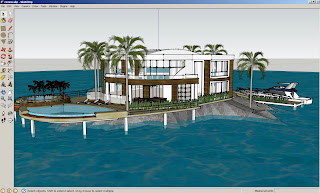
The test scene was fairly simple, a house next to water with a boat, one of the most popular models in the 3D Warehouse that Google offers, created by Andres. The process we then go through for each renderer is the same, and is what most users who are fairly new to making renders with SketchUp would do. We first find the plugin, download it, install it, then start doing test renders of our scene. Note that none of these tests included in-depth tweaking of materials, as the purpose of the review is comparing their features and qualities out of the box.
Indigo Renderer
Indigo Renderer was the first in line, and the installation process is fairly simple. You have to download two components for it to work. First, there's the Indigo Renderer standalone software, then there's the SketchUp plugin. Once both are installed, you simply fire up SketchUp and selectRender from the Plugins menu. On the first run, it will ask you to locate the indigo.exe file. This can be somewhat of a pain if you forgot where you installed the standalone product, but it's usually under C:\Programs Files\Indigo Renderer. Once that's done, the render starts almost immediately.
On this system, to make a render of 1374 x 804 pixels resolution, Indigo took over an hour, although after around 20 minutes most of the noise was gone, and you can save the resulting image at any point. To start tweaking the result, you can go in the Plugins menu and change the settings, including the size of the render and the exposure. There's also a built-in material editor which allows you to modify the SketchUp materials and add additional attributes like reflection, roughness, bump mapping, and so on.
When you start tweaking, you can gain much better results, and depending on the version you buy, you can have some advanced settings available to you. The demo places watermarks on your images but otherwise seems fully functional. The full software costs €145 or €595.
SU Podium
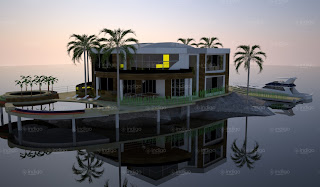
The next renderer we took a look at was SU Podium, which is also one of the oldest options available for SketchUp. The installation of this one is even easier, because there isn't two separate downloads, it's just one plugin. Once you download and install the product, you can start SketchUp and render right away.
The good news is that the render only took 2mins 10secs on default settings. The bad news is that the result looked much worse. Also, there seems to be less options available, although like every other product it comes with its own material editor. The demo also restrict the size of your render, although it doesn't put a watermark on it. The full version is available for $198.
Maxwell for SketchUp
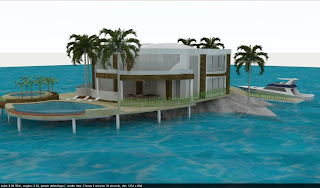
Maxwell is well known for it's standalone product, but only recently did the company release its SketchUp plugin. The installation is much worse than the previous two options. There is no setup file, instead you download a zip file, and then have to read through a readme text, copy files to a specific directory, and install MSVC libraries. Once it's installed however, it worked similarly to the previous choices. Under the Plugins menu, you select Maxwell Fire to start rendering.
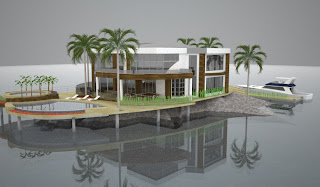
The render took 8 minutes to finish, and was fairly good, certainly better than SU Podium, although no sky was generated, unlike Indigo. Also, the image seemed to have more noise overall. They do win on the price point however, with two versions of the plugin, one free which has a maximum resolution of 800 pixels, and one at $95.
V-Ray
V-Ray is the professional solution, the gold standard used by many studios all over the world. But on top of their high grade Autodesk plugins, they also offer a SketchUp plugin as well. The demo can be downloaded after you register on their site, and works for 30 days. The installation is simple, a single download file that you run. One thing I did notice however is that it slows down SketchUp's loading time.
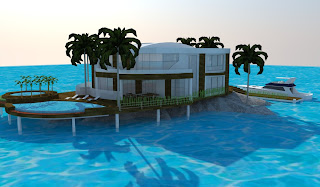
With default settings, a render took 6 minutes, and the quality is somewhat average. Certainly it looks better than some of the previous products, but the default water is left as is, and the bright colors are as well. Fortunately, V-Ray seems to offer the most options and material features of the four reviewed products, allowing very fine grain modifications. On the negative side however is the price, around $800, depending on the reseller.
In closing, it's important to note that all of these renders were done with default settings and materials. If you wish to do high quality SketchUp renders, you would need to dig into the specific material editor of your chosen plugin, and modify them accordingly. Still, it does give a good idea of the default results, and render speeds.

The test scene was fairly simple, a house next to water with a boat, one of the most popular models in the 3D Warehouse that Google offers, created by Andres. The process we then go through for each renderer is the same, and is what most users who are fairly new to making renders with SketchUp would do. We first find the plugin, download it, install it, then start doing test renders of our scene. Note that none of these tests included in-depth tweaking of materials, as the purpose of the review is comparing their features and qualities out of the box.
Indigo Renderer
Indigo Renderer was the first in line, and the installation process is fairly simple. You have to download two components for it to work. First, there's the Indigo Renderer standalone software, then there's the SketchUp plugin. Once both are installed, you simply fire up SketchUp and selectRender from the Plugins menu. On the first run, it will ask you to locate the indigo.exe file. This can be somewhat of a pain if you forgot where you installed the standalone product, but it's usually under C:\Programs Files\Indigo Renderer. Once that's done, the render starts almost immediately.
On this system, to make a render of 1374 x 804 pixels resolution, Indigo took over an hour, although after around 20 minutes most of the noise was gone, and you can save the resulting image at any point. To start tweaking the result, you can go in the Plugins menu and change the settings, including the size of the render and the exposure. There's also a built-in material editor which allows you to modify the SketchUp materials and add additional attributes like reflection, roughness, bump mapping, and so on.
When you start tweaking, you can gain much better results, and depending on the version you buy, you can have some advanced settings available to you. The demo places watermarks on your images but otherwise seems fully functional. The full software costs €145 or €595.
SU Podium
The next renderer we took a look at was SU Podium, which is also one of the oldest options available for SketchUp. The installation of this one is even easier, because there isn't two separate downloads, it's just one plugin. Once you download and install the product, you can start SketchUp and render right away.
The good news is that the render only took 2mins 10secs on default settings. The bad news is that the result looked much worse. Also, there seems to be less options available, although like every other product it comes with its own material editor. The demo also restrict the size of your render, although it doesn't put a watermark on it. The full version is available for $198.
Maxwell for SketchUp
Maxwell is well known for it's standalone product, but only recently did the company release its SketchUp plugin. The installation is much worse than the previous two options. There is no setup file, instead you download a zip file, and then have to read through a readme text, copy files to a specific directory, and install MSVC libraries. Once it's installed however, it worked similarly to the previous choices. Under the Plugins menu, you select Maxwell Fire to start rendering.
The render took 8 minutes to finish, and was fairly good, certainly better than SU Podium, although no sky was generated, unlike Indigo. Also, the image seemed to have more noise overall. They do win on the price point however, with two versions of the plugin, one free which has a maximum resolution of 800 pixels, and one at $95.
V-Ray
V-Ray is the professional solution, the gold standard used by many studios all over the world. But on top of their high grade Autodesk plugins, they also offer a SketchUp plugin as well. The demo can be downloaded after you register on their site, and works for 30 days. The installation is simple, a single download file that you run. One thing I did notice however is that it slows down SketchUp's loading time.
With default settings, a render took 6 minutes, and the quality is somewhat average. Certainly it looks better than some of the previous products, but the default water is left as is, and the bright colors are as well. Fortunately, V-Ray seems to offer the most options and material features of the four reviewed products, allowing very fine grain modifications. On the negative side however is the price, around $800, depending on the reseller.

In closing, it's important to note that all of these renders were done with default settings and materials. If you wish to do high quality SketchUp renders, you would need to dig into the specific material editor of your chosen plugin, and modify them accordingly. Still, it does give a good idea of the default results, and render speeds.
Interior animation made with Sketchup
Animation of restorans interior made with sketchup 8, free modeling software, very simple, very quick solution for presentations - animations
SketchupFurnitureModels
Designing Uncharted 2 with SketchUp (Video)
Art Director, Robh Ruppel, explains how he used Google SketchUp to help conceptualize the look and feel of the award-winning video game, Uncharted 2.
To download a free copy of Google SketchUp, visit:http://sketchup.google.com
Find out more: http://goo.gl/VA1ZS
SketchupFurnitureModels
To download a free copy of Google SketchUp, visit:http://sketchup.google.com
Find out more: http://goo.gl/VA1ZS
SketchupFurnitureModels
SketchUp and CAD - Importing and Preparations (Video)
There are varied approaches to using SketchUp with CAD files. This video is the 1st of 3 videos that present one method we suggest as it is quick and creates a good clean SketchUp model.
In this video we import a CAD plan, group and lock it, delete extra layers and create a unique layer for the floor plan and create scenes to toggle the floor plan visibility on and off.
SketchupFurnitureModels
In this video we import a CAD plan, group and lock it, delete extra layers and create a unique layer for the floor plan and create scenes to toggle the floor plan visibility on and off.
SketchupFurnitureModels